Libel: Integrating a Decorative Display Font into Professional Design Workflows
Selecting the right typeface is rarely just an aesthetic choice; it is a strategic decision that defines the hierarchy, tone, and functionality of a creative project. Libel serves as a specialized tool within this selection process, functioning as a high-impact decorative display font designed to anchor layouts rather than support body text. For designers, marketers, and business owners, understanding where Libel fits into the broader production pipeline is essential for maximizing its value. It is not a utility font for information density, but a deliberate asset used to establish visual identity, create focal points, and elevate packaging or branding materials above standard templates.
In practical application, Libel operates best when treated as a primary visual element similar to a logo mark or an illustration. Its distinct artistic elements and strong character make it ideal for creators seeking to break away from generic sans-serif or serif defaults. However, because it is an all-caps display typeface by design, it requires specific workflow considerations regarding spacing, pairing, and file management. Integrating this font effectively means planning for its limitations and strengths before opening your design software, ensuring that the final output maintains a high-end, professional aesthetic without compromising readability or brand consistency.
Strategic Planning and Pre-Design Assessment
Before implementing Libel in a live project, it is necessary to assess whether the project’s communication goals align with the font’s inherent characteristics. This typeface excels in environments where immediate visual impact takes precedence over extended reading. During the planning phase of a branding kit, event collateral, or product launch, evaluate if the key messages are short, punchy, and emotive. Libel is optimized for headlines, titles, logos, and decorative initials. If your layout requires conveying complex data, terms of service, or multi-paragraph narratives, this font should be reserved strictly for signposting, while a complementary neutral typeface handles the informational load.
Consideration must also be given to the medium of delivery. Display fonts behave differently across print and digital platforms. In packaging design, Libel’s bold forms can create shelf presence and tactile engagement through embossing or foil stamping. In digital workflows, such as social media graphics or web headers, the all-caps nature demands careful attention to responsive scaling. Because the font lacks lowercase letters, testing line-height and letter-spacing at various breakpoints during the wireframing stage prevents legibility issues later in development. This pre-design assessment saves time by confirming that Libel is the correct solution for the specific visual problem at hand.
Technical Implementation and File Management
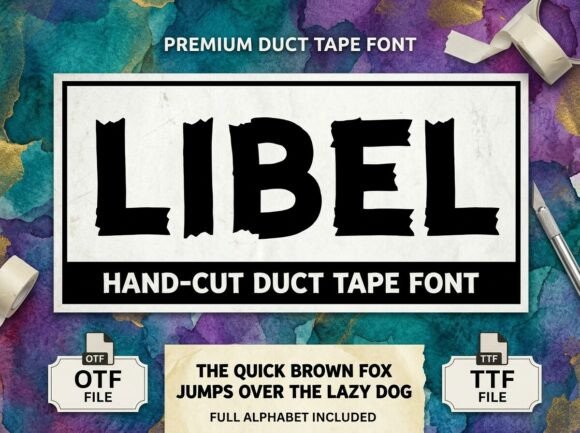
Efficient asset management is critical for maintaining workflow velocity, especially when collaborating across teams or devices. Libel includes both OTF and TTF files, each serving distinct technical purposes in a professional environment. Understanding when to deploy each format ensures seamless performance and access to advanced typographic features.
- OTF (OpenType Format): This is the preferred format for professional design software like Adobe Illustrator, InDesign, and Affinity Designer. OTF files support advanced typographic features, including ligatures, alternates, and precise kerning tables. When working on vector-based branding or high-resolution print layouts, always prioritize the OTF version to ensure the rendering engine accesses the full breadth of the font’s design data.
- TTF (TrueType Format): Use this format for broader compatibility across operating systems and non-specialized applications. TTF ensures that documents created in Microsoft Office, Canva, or older legacy systems display correctly without substitution errors. It is also the safer choice for embedding in certain video editing software or presentation tools where OpenType feature support may be limited.
Organizing these files within a centralized asset library or cloud storage system prevents version conflicts. When handing off projects to clients or external vendors, include both formats along with a usage guide specifying that Libel is an all-caps typeface. This documentation reduces friction during the review process and prevents unauthorized modifications or misuse that could degrade the brand’s visual quality.
Navigating the All-Caps Constraint
The absence of lowercase letters in Libel is a defining feature, not a defect, but it dictates specific execution rules. Typing in lowercase keys will still produce capital letters, which can disrupt the natural rhythm of typing and editing. To maintain efficiency, adopt a workflow where headline copy is drafted separately in a standard case-sensitive font, then pasted into the design layer set in Libel. This allows for easy proofreading and editing without the cognitive dissonance of reading all-caps text during the drafting phase.
Furthermore, the all-caps structure necessitates manual optical adjustments. Automated tracking and leading values often fail with display fonts because the uniform height of capital letters creates dense visual blocks. Increase letter-spacing slightly to improve airiness and legibility, particularly at smaller display sizes. Conversely, tight tracking may be appropriate for massive hero banners to create a cohesive graphical shape. Always adjust spacing optically based on the specific word length and context, rather than relying on default metrics. This level of refinement distinguishes professional typography from amateur layout work.
Integration with Complementary Assets
Libel cannot function in isolation; its effectiveness depends entirely on what surrounds it. Successful integration requires selecting supporting typefaces and visual elements that balance its decorative weight. Pair Libel with clean, structured sans-serifs or understated serifs for body copy. The contrast between Libel’s artistic personality and a neutral workhorse font creates a clear information hierarchy, guiding the viewer’s eye naturally from the headline to the details. Avoid pairing it with other highly stylized display fonts, as this competes for attention and dilutes the intended high-end aesthetic.
In branding workflows, treat Libel as part of a modular system. Define specific use cases in your brand guidelines: perhaps Libel is used exclusively for campaign titles and seasonal messaging, while a different typeface handles the permanent corporate identity. This systematic approach ensures consistency across touchpoints. When combining Libel with photography or illustration, ensure the imagery shares a similar tonal quality. The font’s strong character pairs well with minimalist photography, abstract textures, or solid color fields, but may clash with overly busy or ornate backgrounds. Negative space becomes a crucial active element in the composition, allowing the typeface to breathe and perform its role as the centerpiece.
Quality Control and Output Verification
The final stage of integrating Libel involves rigorous quality control to ensure the design translates accurately from screen to physical or digital output. Because display fonts often have intricate details or unique proportions, they are more susceptible to rendering artifacts than standard text fonts. Before finalizing any project, conduct verification checks specific to this typeface.
- Print Proofing: Verify ink spread and registration. Bold decorative strokes can fill in at small sizes or on uncoated paper stocks. Request a physical press proof or high-fidelity mockup to confirm that the artistic elements remain crisp and distinct.
- Digital Rendering: Test across multiple browsers and devices. Screen hinting varies significantly between Windows and macOS. Ensure that the all-caps forms do not appear pixelated or unevenly spaced at common viewport widths.
- Accessibility Compliance: While Libel is decorative, ensure sufficient color contrast against the background. For web use, verify that the font loads correctly via @font-face declarations and that fallback fonts are specified to prevent layout shifts if the custom font fails to load.
- Licensing Adherence: Confirm that your license covers the intended use case, particularly for commercial packaging, app embedding, or large-scale advertising. Proper licensing is a non-negotiable aspect of professional asset management.
By treating Libel as a specialized component within a structured workflow, creators can leverage its unique qualities without encountering common pitfalls associated with decorative typography. The result is a polished, intentional design that communicates authority and creativity. Whether used for a luxury product label, a bold editorial cover, or a distinctive logo lockup, Libel delivers professional results when supported by thoughtful planning, technical precision, and disciplined execution. The investment in understanding its specific requirements pays dividends in the form of elevated visual communication that stands apart in a crowded marketplace.