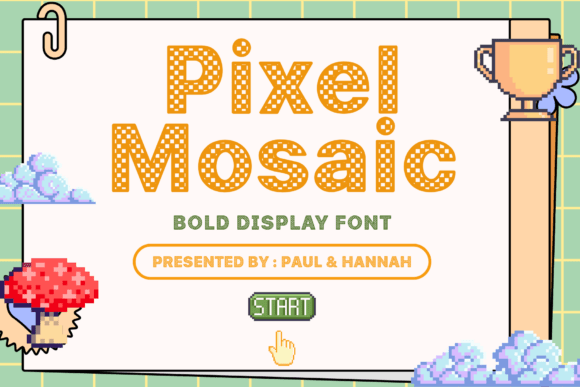
Pixel Mosaic: Bold Checkerboard Display Font
In the crowded landscape of digital and print design, capturing immediate attention is often the primary challenge. Pixel Mosaic addresses this need directly through a distinct visual mechanism: a unique checkerboard pattern embedded within every character. This is not merely a decorative overlay but a fundamental structural element of the typeface. By combining strong geometric shapes with a retro-inspired pixel texture, Pixel Mosaic creates a tension between nostalgia and modern boldness that works exceptionally well for display purposes. For designers, marketers, and content creators, understanding how to leverage this specific aesthetic can transform standard headlines into memorable visual anchors.
The Visual Mechanics of Checkerboard Typography
What makes Pixel Mosaic functionally different from standard pixel fonts is the internal contrast. Traditional pixel art fonts often rely on solid blocks to form letters, which can sometimes result in heavy, dense text blocks that are difficult to read at smaller sizes or against complex backgrounds. The checkerboard motif introduces negative space within the letterforms themselves. This internal texture reduces visual weight while maintaining the overall silhouette of bold, uppercase geometry.
This duality allows the font to perform well in high-energy contexts without overwhelming the layout. When used in YouTube thumbnails or social media graphics, the internal pattern creates a vibration that draws the eye, yet the clear geometric construction ensures legibility remains intact. For creators working in gaming or esports, this balances the aggressive energy required for competitive branding with a playful accessibility that invites engagement rather than intimidation.
Strategic Applications Across Media
The versatility of Pixel Mosaic lies in its ability to adapt to various tonal requirements depending on color, scale, and pairing. It is crucial to approach this font as a specialized tool rather than a universal solution. Its strength is in short-form communication where impact matters more than extended readability.
- Gaming and Esports Identity: Use Pixel Mosaic for team logos, tournament overlays, and stream titles. The retro-digital association is immediate, but the clean lines prevent it from looking dated. Pairing it with neon gradients or dark matte backgrounds enhances the cyberpunk or arcade aesthetic common in this sector.
- Children’s Education and Entertainment: The playful nature of the checkerboard pattern softens the geometric rigidity, making it approachable for younger audiences. It works effectively for book covers, educational app interfaces, and party invitations. Here, bright primary colors and rounded supporting elements help translate the font’s boldness into friendliness.
- Retail Packaging and Merchandise: On t-shirts, stickers, and product labels, Pixel Mosaic acts as a graphic element as much as a typographic one. Because the letters have built-in texture, they often do not require additional drop shadows or outlines to stand out on fabric or cardboard. This simplifies the production process for screen printing and embroidery.
- Event Promotion and Signage: For music festivals, pop-up markets, or art exhibitions, the font conveys creativity and energy. Large-format printing benefits significantly from the internal pattern, as solid blocks of ink can sometimes appear flat or suffer from banding. The mosaic structure breaks up large color fields, adding depth to physical signage.
Maintaining Clarity and Hierarchy
Because Pixel Mosaic is inherently loud, effective design requires disciplined restraint. The most common mistake when using highly stylized display fonts is overuse. To keep results professional and audience-friendly, treat this typeface as the headline actor, not the narrator.
Limit Character Count: This font performs best in short bursts. Three to five words are ideal for maximum impact. If your message requires a subheadline or body copy, switch to a clean sans-serif or a simple monospaced font. The contrast between the intricate checkerboard of Pixel Mosaic and the smooth simplicity of a supporting typeface creates a sophisticated hierarchy that guides the viewer’s eye naturally.
Mind the Background Contrast: While the internal pattern aids legibility, placing this font over a busy photograph or a similarly textured background can cause visual noise. Solid colors, subtle gradients, or blurred imagery provide the necessary canvas for the checkerboard details to register clearly. If you must use a complex background, consider using a solid color block behind the text to create a dedicated reading zone.
Color Strategy: The font’s internal structure interacts uniquely with color. High-contrast combinations (like white on black or yellow on purple) maximize the visibility of the mosaic pattern. Low-contrast or analogous color schemes may cause the internal texture to disappear, rendering the font as a standard bold face. Always test your color choices at the final output size to ensure the defining feature of the typeface remains visible.
Technical Considerations for Multi-Platform Use
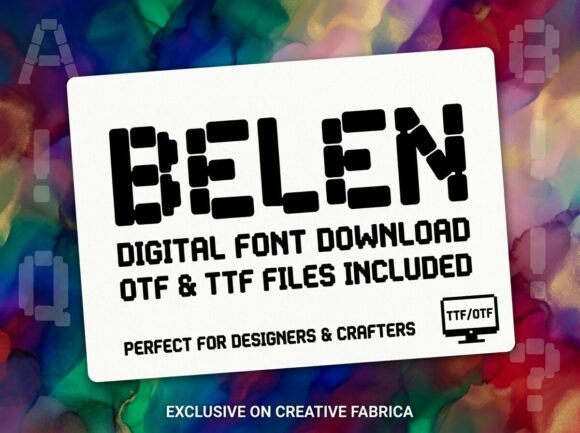
Pixel Mosaic includes uppercase, lowercase, numbers, punctuation, and multilingual support, packaged in OTF, TTF, and WOFF formats. This technical breadth supports diverse workflows, but each format serves a specific purpose.
For print projects like posters and packaging, the OTF or TTF files provide the vector precision needed for crisp edges at any scale. When designing for merchandise, ensure your file resolution matches the printer’s specifications; while the font is vector-based, rasterizing it prematurely can degrade the sharp pixel edges that define its character.
For digital applications, including websites and social media templates, the WOFF format ensures fast loading times and consistent rendering across browsers. When using Pixel Mosaic in video content or motion graphics, be aware that the internal checkerboard pattern can cause moiré effects during compression or scaling. Rendering at a higher resolution and downscaling, or applying a slight blur during export, can mitigate these artifacts while preserving the intended aesthetic.
Creative Variations and Customization
While Pixel Mosaic is complete out of the box, its geometric foundation invites creative modification. Designers comfortable with vector editing can explore variations to suit specific brand identities. Adjusting the tracking (letter spacing) dramatically changes the mood; tighter spacing creates a cohesive, logo-like unit, while wider spacing evokes a cinematic or architectural feel.
You might also experiment with selective coloring. Applying different colors to alternating letters or using gradient fills that align with the grid can enhance the mosaic effect. However, maintain consistency. If you establish a rule for how the pattern interacts with color, apply it systematically across the project to avoid visual chaos.
Ultimately, Pixel Mosaic offers a bridge between retro nostalgia and contemporary bold design. It provides a ready-made texture that saves time on manual illustration while delivering a custom, handcrafted appearance. By respecting its display-only nature and pairing it thoughtfully with complementary elements, creators can harness its energy to produce work that is both visually striking and strategically effective. Whether you are designing a thumbnail that needs to stop the scroll or packaging that needs to pop off the shelf, this font provides the structural boldness required to make a lasting impression.